
[Logistics] The Software Cheat: Why "Confirm Edit on Release" is Mandatory for High Ping
Hello to the overseas grinders. This is the Chief Strategy Officer at HC TOPUP.
You know the feeling. You try to double-edit through a floor and a cone. You press the edit key, you select the tiles, you press the confirm key... and thud. You slam your face into your own wall.
The server didn't register your "Confirm" press in time. On 0 ping, this is a mistake. On 100ms ping, this is a tragedy.
What if I told you there is a way to delete 33% of your button presses and force the server to register your edits faster? It’s not a hack, and it’s not a macro. It is a setting hidden in your menu called "Confirm Edit on Release."
For local players, this setting is a "preference." For us overseas warriors, it is a requirement. Today, we explain why.
1. The Math of Latency: 3 Steps vs. 2 Steps
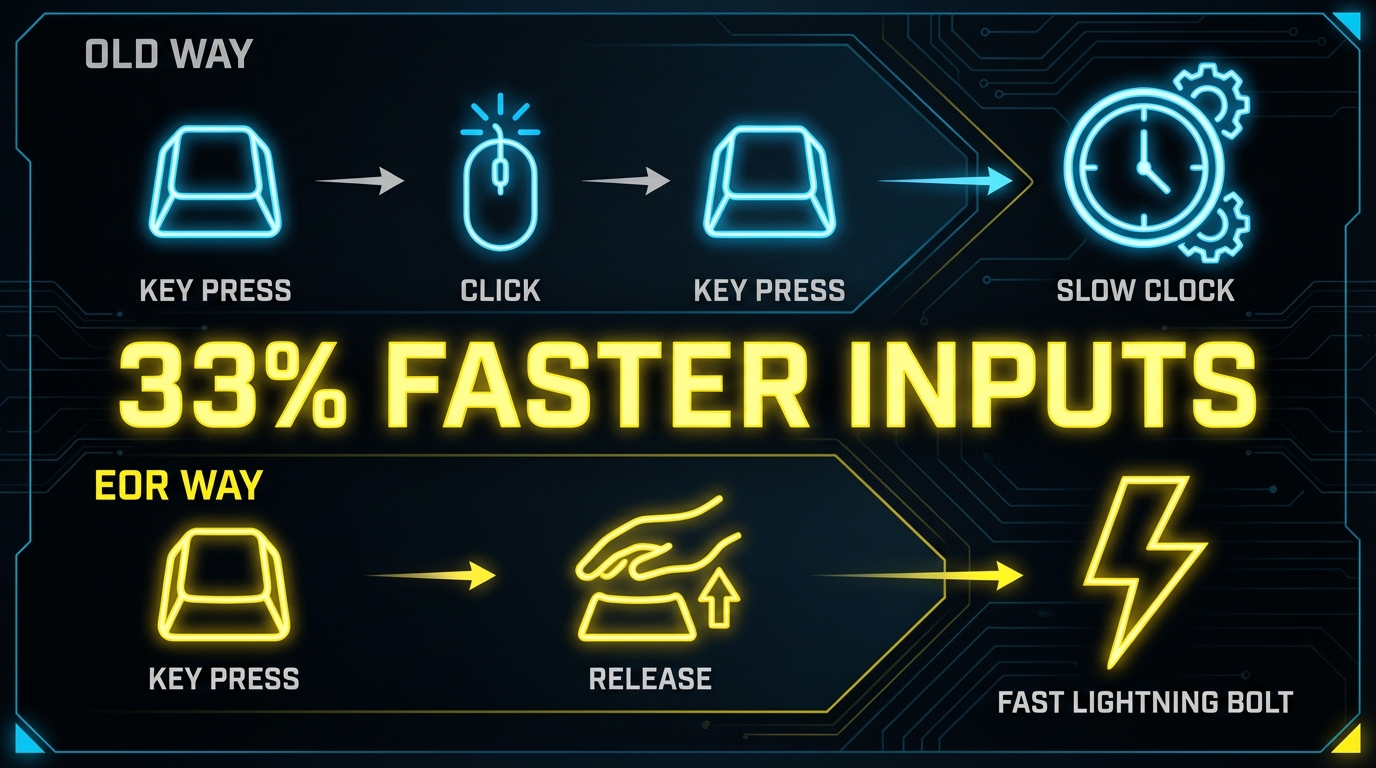
To understand why this setting saves your life, we need to look at the "Action Economy" of an edit.
Standard Editing (EOR OFF)
-
Press Edit Key (Signal sent to server).
-
Click/Select Tiles.
-
Press Confirm Key (Signal sent to server).
-
Total Actions: 3.
-
Total Server Pings: 2.
Confirm Edit on Release (EOR ON)
-
Press Edit Key.
-
Click/Select Tiles -> Release Mouse Button.
-
Total Actions: 2.
-
Total Server Pings: 1 (The release triggers the confirm instantly).
The High-Ping Logic:
When you have 100ms latency, every time you have to press a button to "talk" to the server, you add delay. By removing the "Confirm Key," you are literally removing a checkpoint. You don't need to be faster; you just made the process shorter.
2. How to Enable the "Lag Killer"
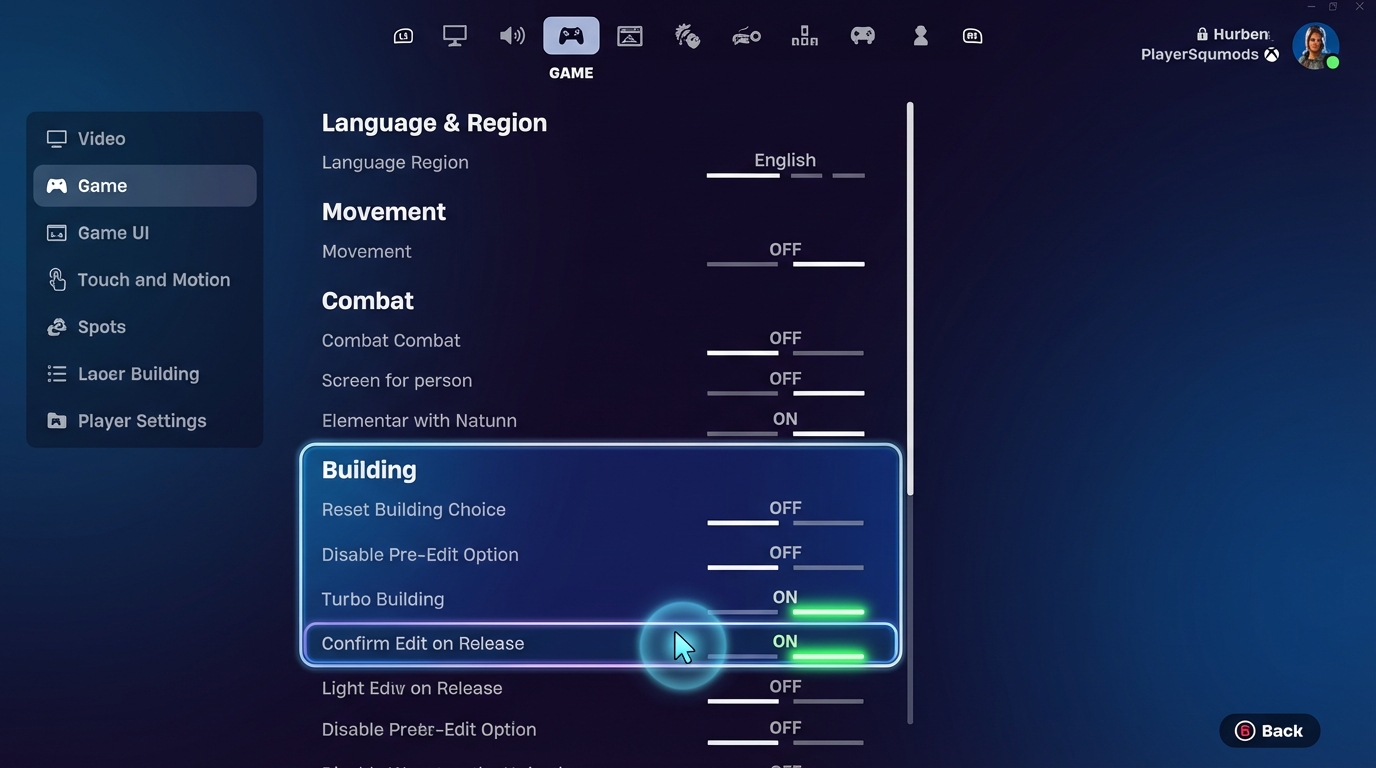
If you haven't turned this on yet, do it now.
-
Open Settings.
-
Go to the Game tab (Gear icon).
-
Scroll down to the Building section.
-
Find "Confirm Edit on Release".
-
Set it to ON.
Note: As of Chapter 5, Epic also added "Auto Confirm Edits" which can be set to "Edit," "Reset," or "Both." We recommend setting it to Both for maximum speed.
3. The "Rhythm" Adjustment: Retraining Your Brain
Warning: The first day you use this, you will mess up.
Your muscle memory is wired to press a confirm key (like 'E' or 'F'). When you switch to EOR, you will accidentally press that key out of habit, which might cancel your edit mode or mess up your next build.
The Drill to Fix It
Go into Creative.
-
Place a wall.
-
Hold your "Select" (Left Click) button.
-
Draw a window.
-
Lift your finger off the mouse. Pop. The window opens.
-
Repeat this 100 times until your brain realizes: "Releasing is the new Clicking."
4. Addressing the Controversy: "But Pros Don't Use It?"
You might hear some top pros (like Mongraal or MrSavage) debating this setting. Some 0-ping players prefer EOR OFF because it allows them to "hold" an edit (keep the tiles selected) while waiting for an opponent to move, without confirming it.
Here is the hard truth for YOU:
You are not on 0 ping. You are on 100ms ping.
You do not have the luxury of "holding" an edit and reacting. If you hold an edit on high ping, you will likely get shot through it before you can release.
Your advantage is SPEED, not precision holding. You need to edit, shoot, and reset instantly. EOR is the only way to achieve "Instant Edits" on high latency. Ignore the 0-ping pros; play for your reality.
5. Logistics: Speed in Game, Speed in Support
The philosophy of "Confirm Edit on Release" is simple: Cut out the middleman. Remove the unnecessary steps to get the result faster.
At HC TOPUP, we apply this same philosophy to your gaming lifestyle.
The "One-Click" Top-Up Experience
-
The Old Way (Slow): Go to a store -> Buy a physical card -> Scratch code -> Type code -> Error -> Retry.
-
The HC TOPUP Way (EOR On): Select Package -> Pay -> Instant Delivery.
We know that when you are in the zone, every second counts. Whether it's editing a wall or buying the Battle Pass, you shouldn't have to wait. We provide the "Low Latency" service your account deserves.
100% Secure: Speed doesn't mean reckless. We are official, safe, and reliable.
Conclusion: Unleash Your True Potential
Stop fighting the game engine.
If you are playing on overseas servers without "Confirm Edit on Release," you are running a race with weights on your ankles.
Turn it on. Endure the 2 days of awkward adjustment. And then enjoy the feeling of edits that flow like water, even when the ping counter says 120ms.
Optimize your settings. Optimize your logistics. Dominate the lobby.
👉 Return to Base: The Path to Mastery - Fortnite Pro Tips Pillar Page


-400x400.png)